




Marksol Confirm app icon
Marksol ConfirmShopify app · WhatsApp COD Orders
Now live in Pakistan

WhatsApp COD Order Confirmation App for Shopify

Stop shipping fake Cash on Delivery orders. Marksol Confirm lets every customer confirm, cancel or fix their address on WhatsApp in one tap, then tags the order in Shopify and books it with Leopards for you. No calling team, no message credits, and it runs on your own WhatsApp number.
One-tap confirm on WhatsAppLeopards booking and slips built inFake-order risk scoreRoman Urdu, Urdu, EnglishJazzCash and Easypaisa advance
admin.shopify.com · Marksol Confirm
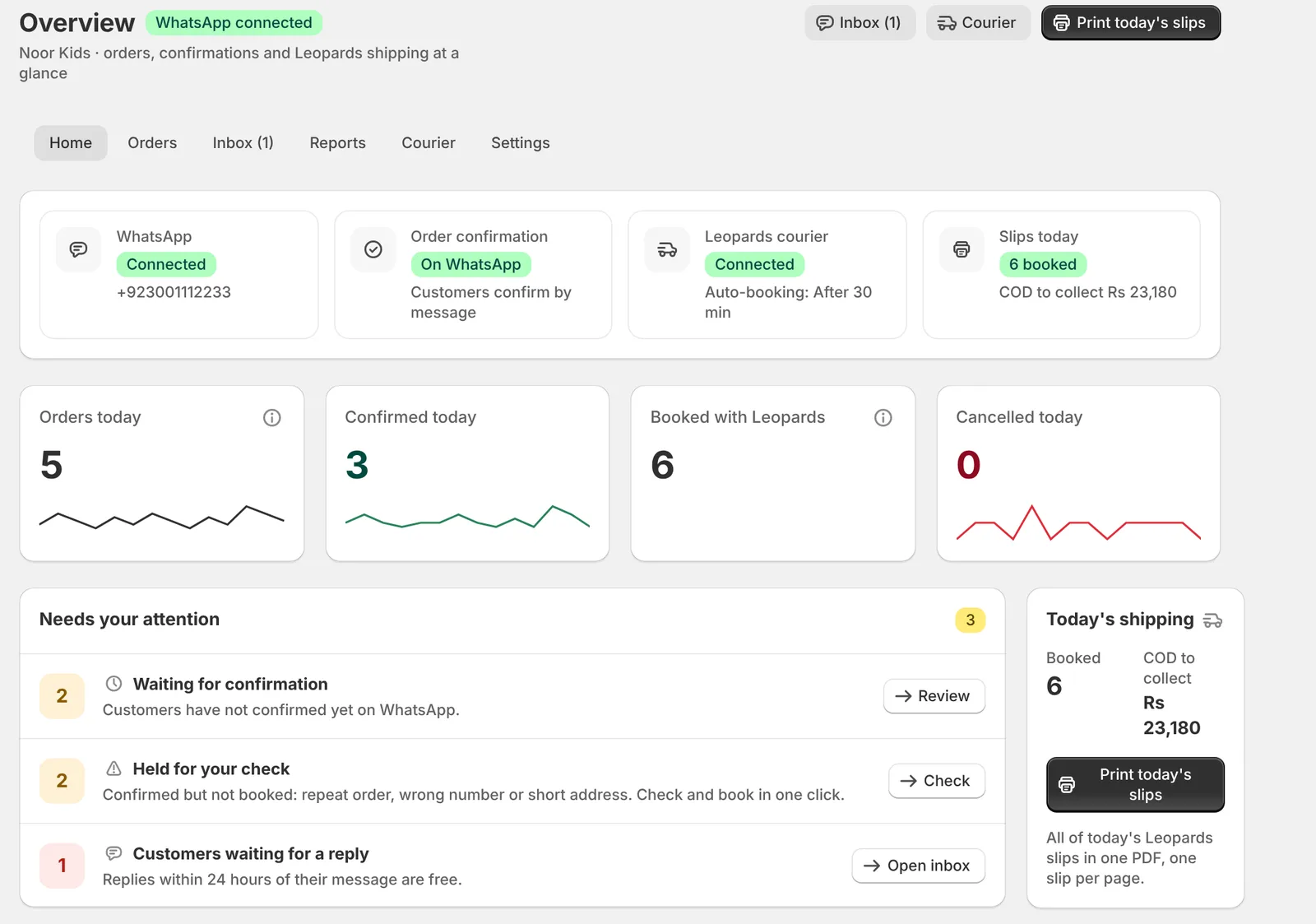
Marksol Confirm overview inside Shopify admin with WhatsApp and Leopards status, orders today, items that need attention and today's shipping
Order #1042 MC-Confirmed
Order #1056 ⚠ Risk 55
1 tapto confirm, cancel or change the address on WhatsApp
0 callsyour team stops dialling customers one by one
~70%of Pakistani online shoppers prefer Cash on DeliveryTGM Research, via DHL
1 in 5COD parcels in Pakistan come back undeliveredDHL Pakistan estimate

In short: Marksol Confirm is a Shopify app made by Marksol in Lahore for stores that take Cash on Delivery. When a COD order is placed, the customer confirms it on WhatsApp with buttons, the order is tagged Confirmed or Cancelled in Shopify, risky orders are held before you ship, and clean confirmed orders are booked with Leopards from inside Shopify, with one slip per order and all of the day’s slips in one PDF. PostEx and TCS get a ready CSV. Customers start the chat, so replies are free under Meta’s WhatsApp pricing, and the app never sends paid messages.

The COD problem

Every fake COD order costs you twice

You pay to pack and ship it, then you pay again when it comes back. Calling every buyer eats hours, many never pick up, and the record of who said what lives in someone’s phone.

📦

Returned parcels

Impulse and fake orders are refused at the door. The courier still charges you both ways and the stock is stuck for days.

📞

Hours on the phone

Confirmation calls need a person, a SIM and a script. Orders wait while customers don’t answer unknown numbers.

🧾

No clean record

Who confirmed, who cancelled and why never reaches Shopify, so you can’t see patterns or block repeat fake buyers.

How it works

From order to confirmed in under a minute

The customer starts the chat from your thank-you page or order email. That keeps replies free and keeps your WhatsApp number safe.

Order is placed

A COD order lands in Shopify. Marksol Confirm tags it Pending and scores it for fake-order signs.

One tap to WhatsApp

A “Confirm on WhatsApp” button on the thank-you page opens WhatsApp with the order code already typed.

Customer confirms

They see items, total and address, then tap Confirm, Change address or Cancel with a reason.

Shopify updates itself

The order gets its tag and a note. Your team packs only confirmed orders and books them in one file.

On WhatsApp

What your customer sees

Short, friendly messages with buttons, in Roman Urdu, Urdu or English. Your brand name in every message.

Your StoreBusiness account
Confirm karein: Order code 7KQ2M
Order #2115
Kurta Shalwar (3-4Y)
Rs 2,650 · COD
Confirm kareinPata badleinCancel karein
Confirm karein
Shukriya! Order confirm ho gaya ✅

Confirm in one tap

Order details with buttons. No typing, no call.

Your StoreBusiness account
Order cancel karna hai
Cancel ki wajah bata dein:
Qeemat zyada haiGhalti se order huaDer ho rahi haiKahin aur se le liya
Ghalti se order hua

Cancel with a reason

You learn why orders fail, right in your reports.

Your StoreBusiness account
Rider ki asaani ke liye location bhej dein.
📍 Location bhejein
📍 Johar Town, Lahore
maps.google.com/…
Location order note mein save ho gayi.

Address and map pin

Wrong addresses get fixed before the rider leaves.

Your StoreBusiness account
Advance payment par order jaldi bheja jata hai.
Advance pay kareinCOD hi theek hai
🖼️ Payment screenshot
Shukriya! Order Advance Paid mark ho gaya.

Advance payment

JazzCash or Easypaisa, screenshot in the same chat.

Inside Shopify

A premium dashboard your team will actually use

Marksol Confirm opens inside Shopify admin and looks like Shopify, so there is nothing new to learn.

Overview

Your whole COD day on one screen

Open Shopify and see orders, confirmations, Leopards bookings and anything that needs you, without opening five tabs.

  • Status at a glance: WhatsApp number, confirmation mode, Leopards connection and auto-booking time
  • Today’s numbers: orders, confirmed, booked with Leopards and cancelled, with 14-day trend lines
  • Needs your attention: orders waiting, orders held for a check, booking issues and customers waiting for a reply, each with a one-click fix
  • Today’s shipping: parcels booked, COD to collect and a Print today’s slips button
  • Delivery results for 30 days: in transit, delivered, returned and your return rate
Overview
Marksol Confirm overview with status tiles, needs your attention list, today's shipping and Leopards delivery results
Orders

Every COD order, sorted and scored

Filter orders by status, search by name, phone or order number, and act on many at once.
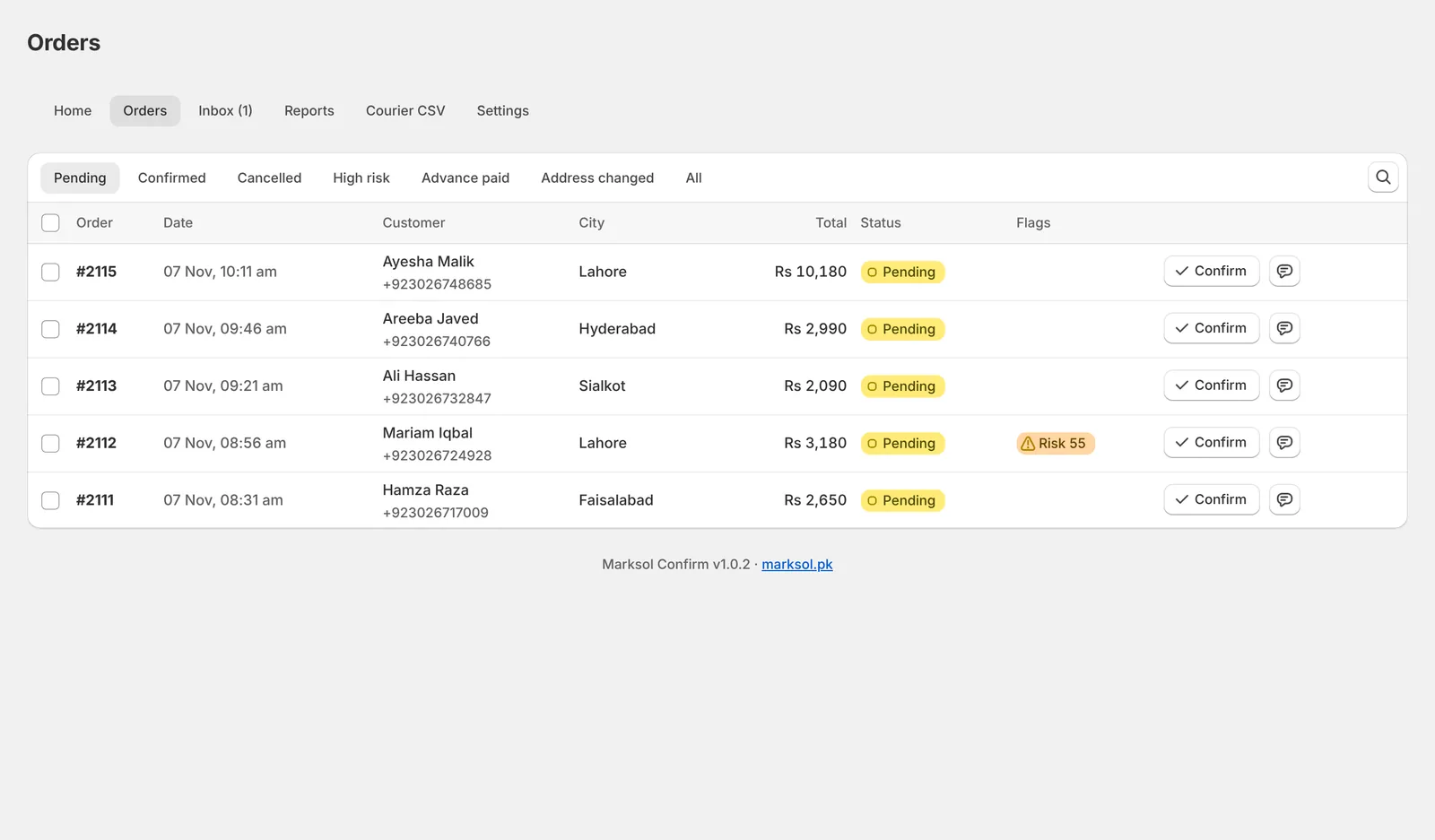
  • Tabs for Pending, Confirmed, To book, Booked, Returned, Cancelled, High risk, Advance paid and Address changed
  • Fake-order risk score on every order, with the reasons shown
  • Bulk actions to confirm, cancel, book with Leopards or print slips for many orders at once
  • Order detail with items, address, location pin, chat and cancel reason
Orders
Marksol Confirm orders list with status tabs, risk flags and confirm buttons
Inbox

A shared WhatsApp inbox for your team

Every conversation sits next to its order. No passing one phone around the office.
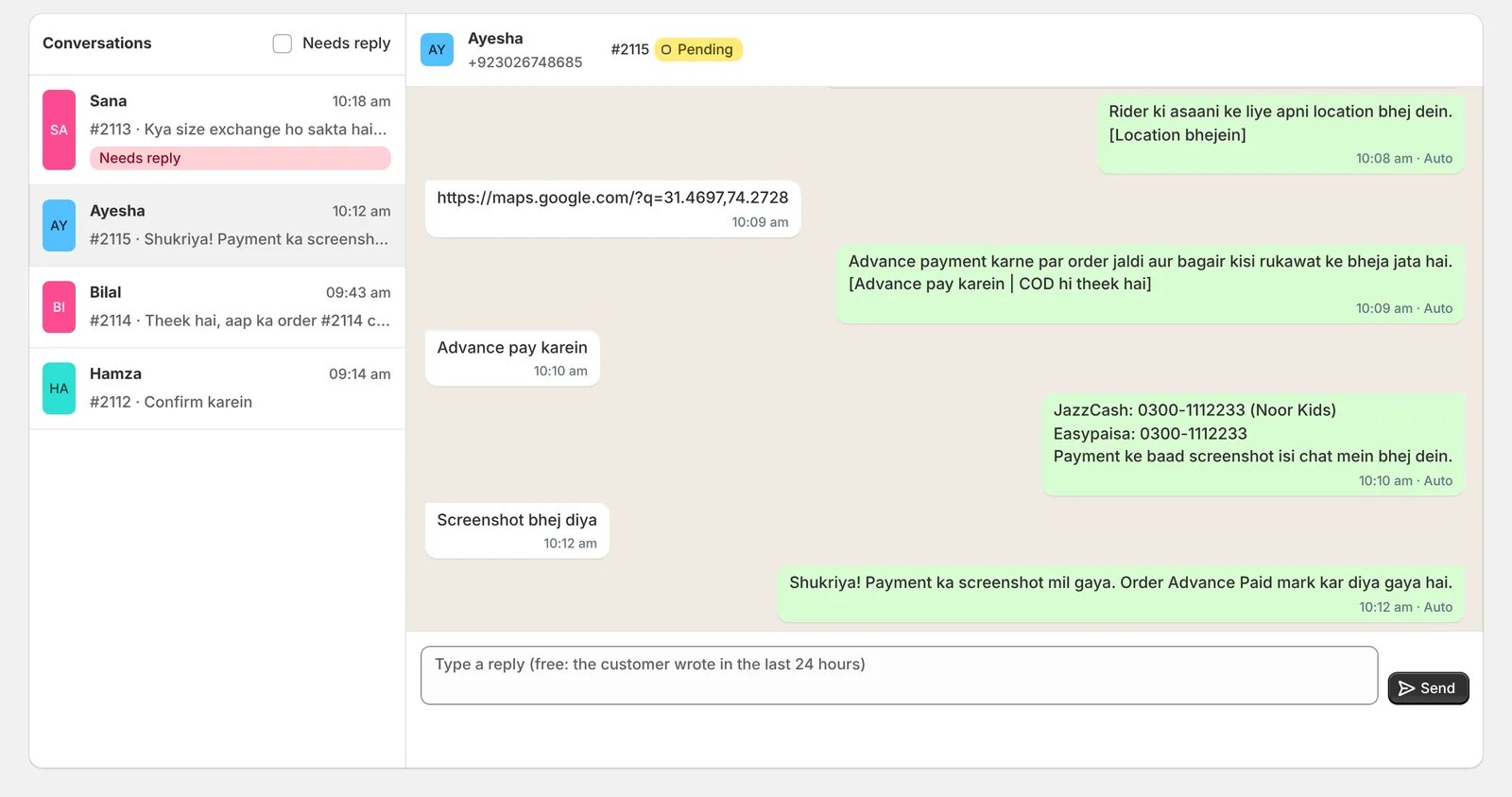
  • WhatsApp-style chat with the order number and status on top
  • Needs reply filter so no customer is left waiting
  • Reply from Shopify, free while the customer’s chat is open (24 hours)
  • Payment screenshots and location pins saved with the order
Inbox
Marksol Confirm shared WhatsApp inbox showing a customer confirming an order and sending an advance payment screenshot
Reports

Know why orders fail, and when customers reply

Turn WhatsApp replies into numbers you can act on.
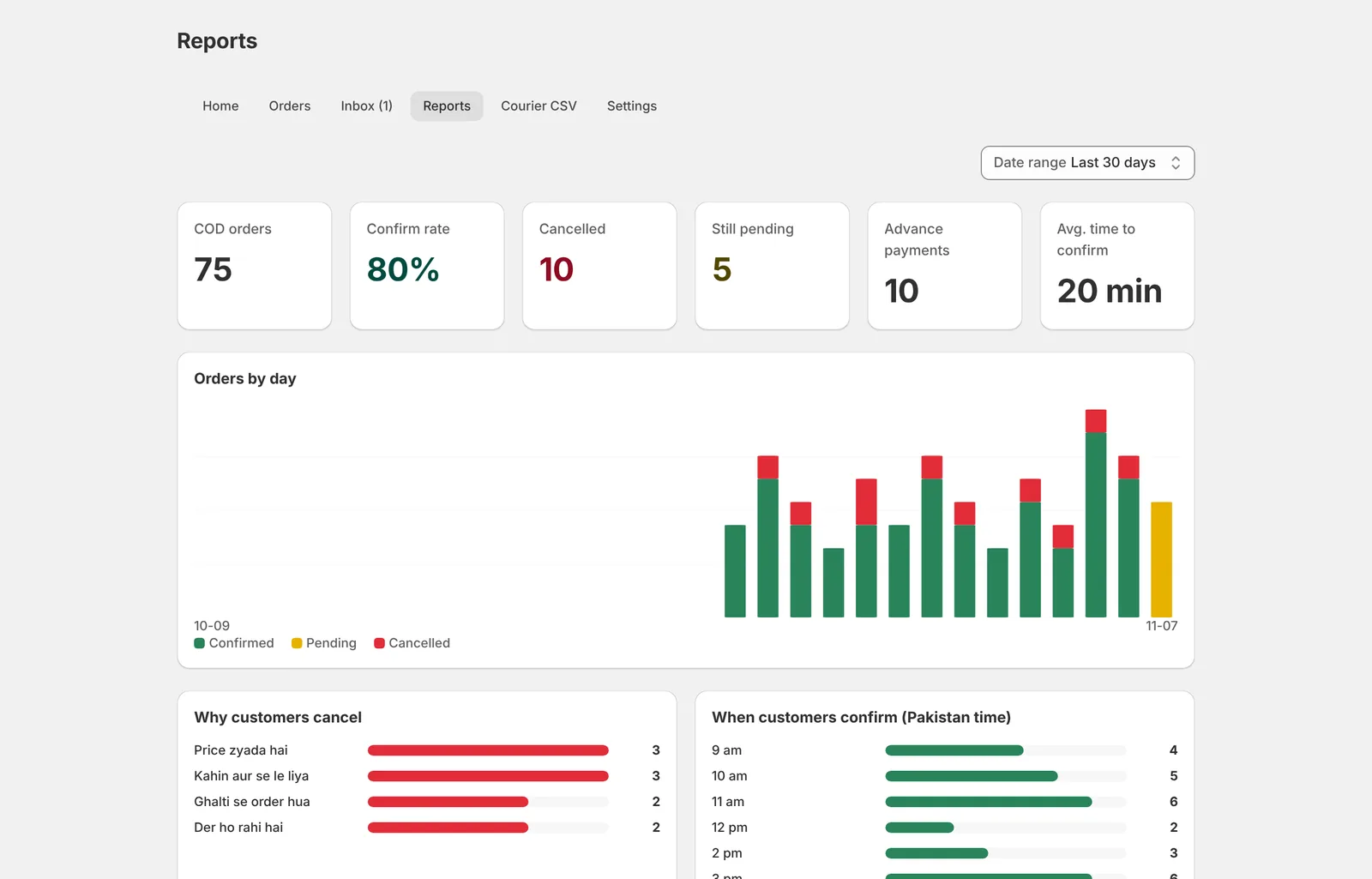
  • Confirm rate, cancelled, still pending, advance payments and average time to confirm
  • Orders by day chart for the last 7, 30 or 90 days
  • Why customers cancel, so you can fix price, speed or ad targeting
  • When customers confirm by hour, Pakistan time
Reports
Marksol Confirm reports with confirm rate, orders by day chart and cancel reasons
Leopards built in

Book Leopards and print slips without leaving Shopify

Connect your own Leopards merchant account once. No portal, no copy-paste, no extra fee from us.
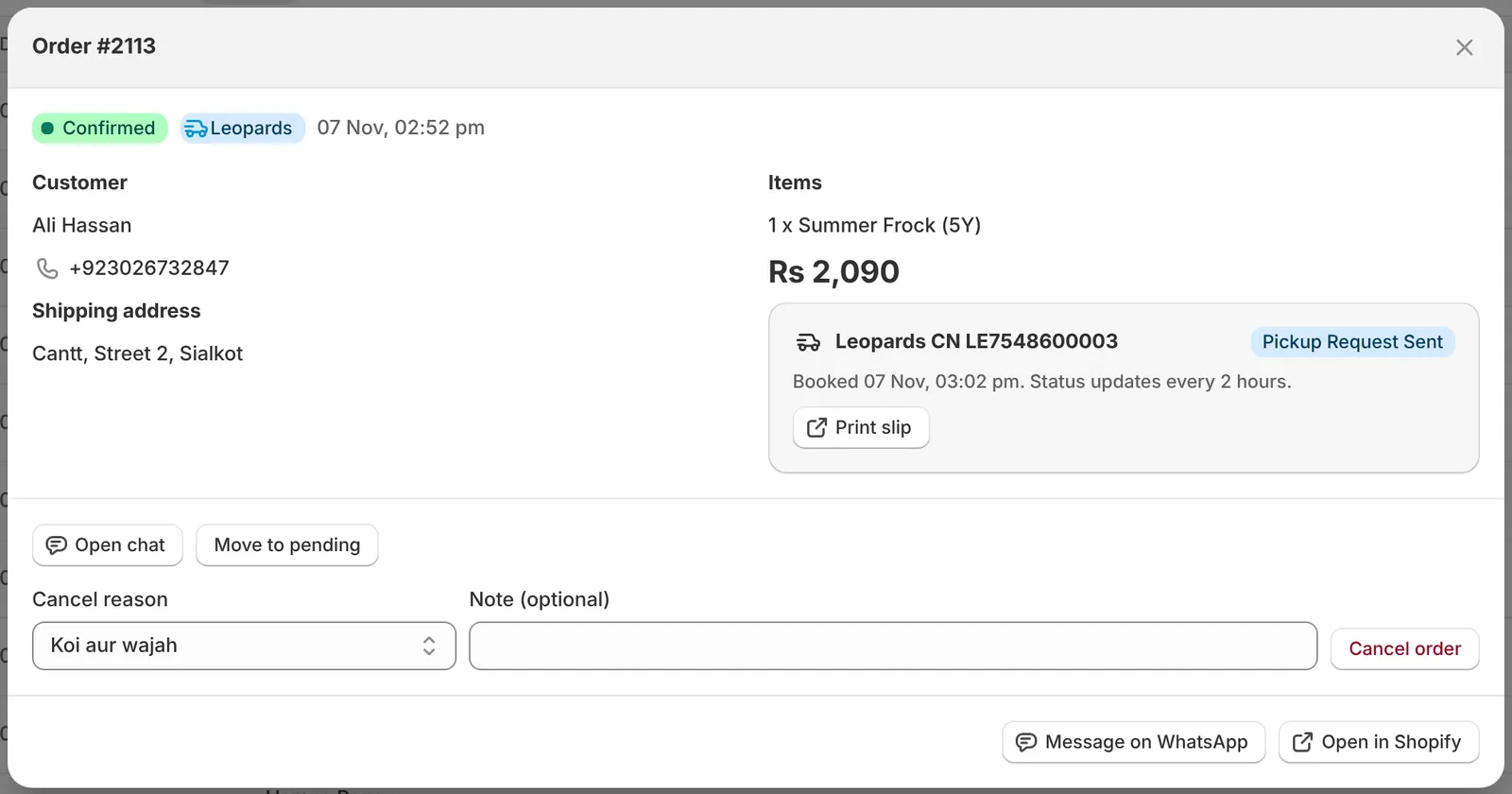
  • One click or bulk booking: CN number and slip appear on the order straight away
  • One order, one parcel, one slip, even when the order has many items
  • Second contact number printed on every slip next to the customer’s, so the rider can call your store
  • Print today’s slips as one PDF, one slip per page, ready for the printer
  • Tracking every 2 hours with Delivered and Returned tags in Shopify and a return rate in reports
  • Updated address, map pin and COD 0 for advance-paid orders go to Leopards automatically
Order booked with Leopards
Shopify COD order booked with Leopards from Marksol Confirm with CN number, status and print slip button
Automation

Confirm and book on autopilot, your way

Choose how much runs by itself. Change it any time from the Courier page.
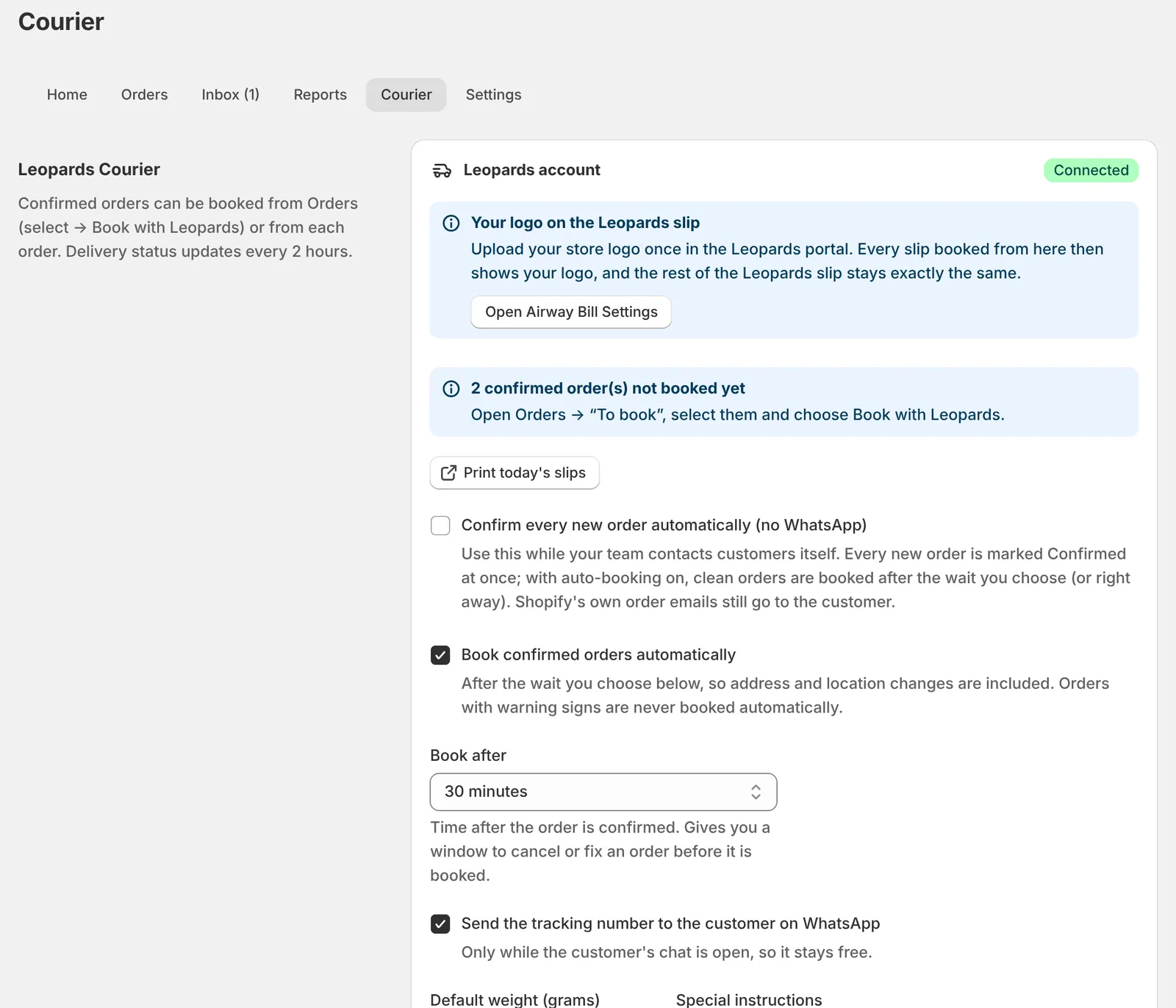
  • Two ways to confirm: customers confirm on WhatsApp, or every new order is confirmed at once while your team calls customers itself
  • Auto-booking right away, after 15 or 30 minutes, 1 or 2 hours, or any custom time up to 24 hours
  • Only clean orders go out by themselves: wrong numbers, short addresses, repeat orders and past cancellers are held for your check
  • Booking issues flagged, such as an unknown city, with a city picker to fix and book in one click
  • PostEx and TCS: confirmed orders still export as a ready CSV for bulk booking
Courier
Marksol Confirm Leopards settings with automatic confirmation, auto-booking and booking delay options
Settings

Make it sound like your brand

Control every message and rule without touching code.
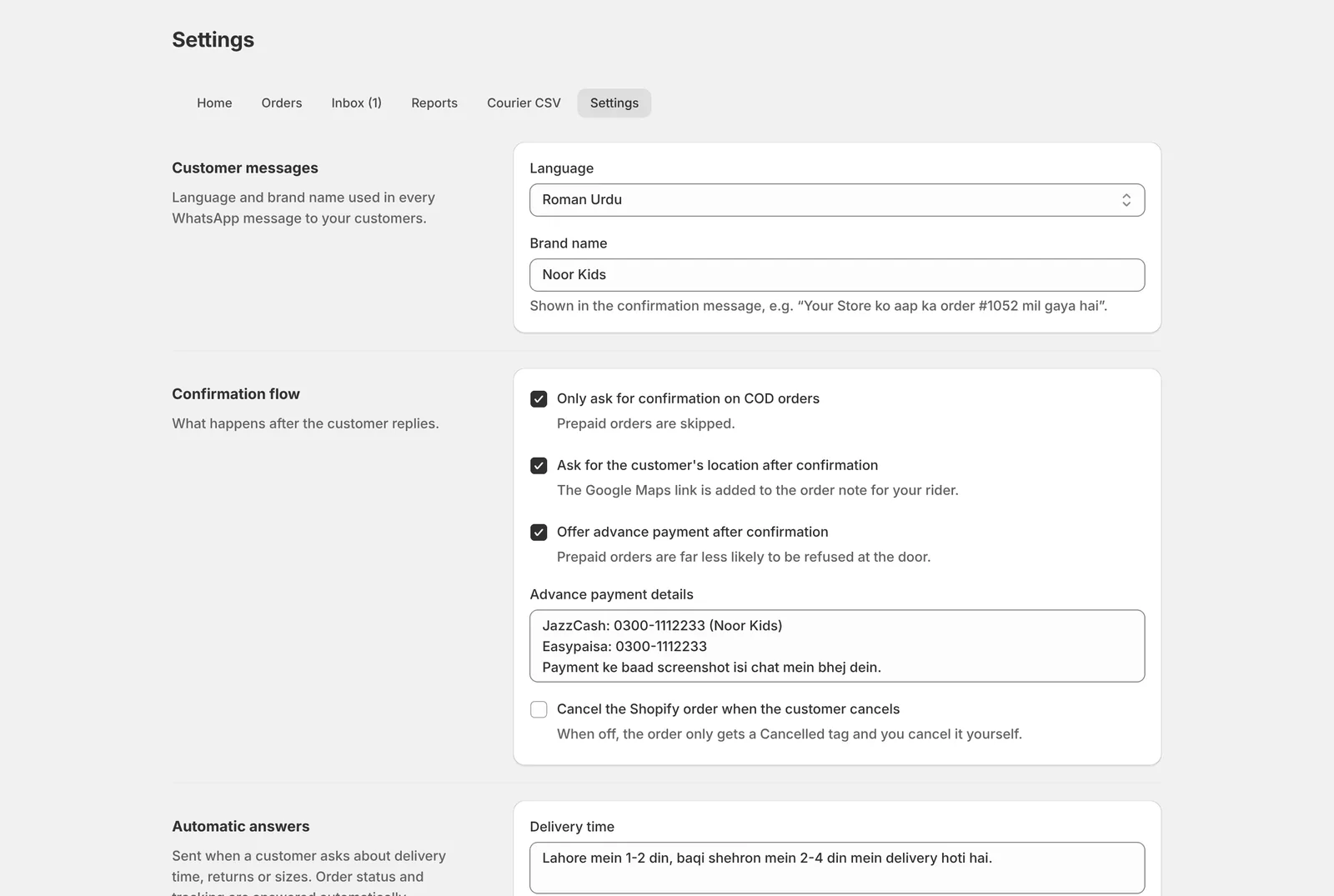
  • Language: Roman Urdu, Urdu or English, with your brand name
  • Flow switches: ask for location, offer advance payment, auto-cancel in Shopify
  • Automatic answers for delivery time, returns and size questions
  • Blocklist, tag prefix, alert email and daily summary
Settings
Marksol Confirm settings for message language, confirmation flow and advance payment details
Every feature

Everything included in Marksol Confirm

The complete list, so you know exactly what you get.

✅Confirmation

  • WhatsApp confirm, cancel and change-address buttons
  • Cancel reasons: price, mistake, late, bought elsewhere, other
  • Order matched by confirmation code, order number or phone
  • Works even if the customer taps before Shopify sends the order
  • Only COD orders, prepaid orders skipped
  • Optional automatic confirmation without WhatsApp
  • “Haan”, “ok” and similar replies understood

🏷️Shopify sync

  • Pending, Confirmed, Cancelled, No-Reply tags
  • Risk, Blocked, Advance Paid and Address Changed tags
  • Order notes with reason, location and new address
  • Optional auto-cancel of the Shopify order
  • Stays in sync when you cancel or fulfil in Shopify
  • Custom tag prefix

🛡️Fake-order protection

  • Risk score on every order with reasons
  • Invalid Pakistani mobile numbers flagged
  • Too-short addresses flagged
  • Repeat orders from one number in 24 hours
  • Customers who cancelled before
  • Blocklist for known fake buyers

📍Delivery

  • Address change inside the chat
  • Location pin request after confirmation
  • Google Maps link saved for your rider
  • Tracking number sent when the order ships
  • “Where is my order” answered automatically
  • Courier CSV for PostEx and TCS

🚚Leopards shipping

  • Book one order or many in one click
  • Automatic booking right away or after your chosen wait
  • One parcel and one slip per order
  • Second contact number on every slip
  • All of today’s slips in one PDF
  • Delivered and Returned tags, return rate report

💳Payments

  • Advance payment offer after confirmation
  • Your JazzCash, Easypaisa or bank details
  • Payment screenshot received in the chat
  • Order tagged Advance Paid
  • Customer can keep COD with one tap
  • Advance orders exported with COD 0

💬Team and inbox

  • Shared WhatsApp inbox inside Shopify
  • Needs-reply filter and alerts
  • Urdu right-to-left text supported
  • Auto replies for delivery, returns and sizes
  • Polite fallback reply, never spammy
  • One-click “Message on WhatsApp” from staff phones with a ready confirm link

🚀Entry points

  • “Confirm on WhatsApp” block on the thank-you page
  • WhatsApp button for the order confirmation email
  • QR code for packing slips
  • Ready-to-paste snippets in settings
  • Order code pre-typed for the customer
  • Your own WhatsApp Business number

📊Reports and alerts

  • Confirm rate and average time to confirm
  • Orders by day: confirmed, pending, cancelled
  • Cancel reasons and busy hours
  • Delivered, returned and return rate by Leopards
  • Daily summary email at night
  • Email alert when a chat needs a person
  • Date ranges of 7, 30 and 90 days

⏰Follow-ups

  • No-Reply tag after the time you choose
  • Orders that need a call listed for your team
  • One-click “Message on WhatsApp” from staff phones
  • No paid template messages, ever
  • Replies only when the customer writes first
  • No bulk or promotional sending
Compare

The best way to confirm COD orders

How Marksol Confirm stacks up against the usual options.

What mattersMarksol ConfirmPhone callsSMSBulk WhatsApp tools
Customer confirms in one tapYesNoNoSometimes
Shopify order tagged automaticallyYesNoNoSometimes
Fake-order risk score and blocklistYesNoNoRarely
Address fix and location pinYesManualNoRarely
Advance payment with screenshotYesManualNoNo
Cost per confirmationFree replies (customer starts the chat)Staff time and call chargesPer SMSMessage credits
Roman Urdu and Urdu messagesYesYesLimitedLimited
Leopards booking and slips inside ShopifyYesNoNoNo
Delivered and returned trackingYesNoNoNo
Courier CSV for PostEx and TCSYesNoNoNo
Risk to your WhatsApp numberLowNoneNoneHigh if blasting
Costs

Free WhatsApp replies. No message credits.

Marksol Confirm uses Meta’s official WhatsApp Business Platform with your own number. Customers message you first, so replying is free under Meta’s pricing. The app never sends paid template messages, so there is no WhatsApp bill. You never buy credits from us.

Replies in a chat the customer startedFree from Meta
Order updates while the chat is open (24 hours)Free from Meta
Paid template messagesNever sent
Leopards booking from the appNo extra fee from us
Setup of number, app and thank-you buttonDone by Marksol
Marksol Confirm monthly planAnnounced at launch
Setup

Live on your store in a day

Marksol does the setup with you. You only log in where your own accounts are involved.

Install the app

Approve Marksol Confirm in your Shopify admin. It reads COD orders and adds tags.

Connect WhatsApp

We connect a WhatsApp Business number on Meta’s official platform, ideally a new number just for orders.

Add the button

Add the “Confirm on WhatsApp” block to your thank-you page and the button to your order email.

Go live

Set your language, advance payment details and answers. Place a test order and you are done.

Trust

Built safe, by a Pakistani Shopify team

🔒

Official APIs only

Shopify Admin API and Meta’s WhatsApp Cloud API. No unofficial WhatsApp hacks that get numbers banned.

✅

Verified requests

Every Shopify and WhatsApp webhook is signature-checked before it is trusted.

🗂️

Private by default

Payment screenshots are stored privately and exports use expiring links. Customer data requests are honoured.

🇵🇰

Made in Lahore

Built and supported by Marksol, a Shopify and e-commerce growth agency registered with SECP, FBR and PSEB.

Coming next

WooCommerce and WordPress version

Running your store on WooCommerce? The same WhatsApp COD confirmation is coming as a WordPress plugin. Message us to join the early list.

Join the WooCommerce list (opens in a new tab)
FAQ

Questions store owners ask

What is the best WhatsApp order confirmation app for Shopify in Pakistan?

Marksol Confirm is built specifically for Pakistani Shopify stores that take Cash on Delivery. It confirms orders on WhatsApp with buttons in Roman Urdu, Urdu or English, tags orders in Shopify, scores fake orders, collects JazzCash or Easypaisa advance payments, books confirmed orders with Leopards and prints the slips. Replies are free because the customer starts the chat, so there are no message credits to buy.

How do I confirm COD orders on WhatsApp automatically?

Install Marksol Confirm, connect a WhatsApp Business number and add the “Confirm on WhatsApp” button to your thank-you page. When a customer places a COD order, they tap the button, get the order details on WhatsApp and confirm with one tap. The app tags the Shopify order Confirmed without anyone on your team doing anything.

How does it reduce fake COD orders and returns (RTO)?

Orders are only packed after the customer confirms on WhatsApp. Each order also gets a risk score for invalid numbers, short addresses, repeat orders and past cancellations, and you can block known fake buyers. Customers who want faster delivery can pay in advance, and prepaid orders are far less likely to be refused at the door.

Do I need a separate WhatsApp number?

We recommend a new number just for order confirmation. Your current WhatsApp Business keeps working on your phone exactly as it is. Marksol sets the new number up with you on Meta’s official platform.

Will my WhatsApp number get blocked?

Numbers get blocked when a business sends lots of unwanted messages. With Marksol Confirm the customer starts the chat from your thank-you page or email, which is the safest way to use WhatsApp for business. The app never sends bulk promotional messages.

Does someone need to reply to customers?

No. Confirm, cancel, address changes, location, advance payment, order status and common questions are handled automatically. Your team only steps in when the app flags a chat that needs a person, and you get an email alert when that happens.

How much does WhatsApp cost with this app?

Nothing for messages. Replies inside a chat the customer started are free under Meta’s WhatsApp pricing, and that covers the whole confirmation flow. Marksol Confirm never sends paid template or bulk messages, so there is no WhatsApp bill from Meta.

Does it book Leopards automatically and print the slips?

Yes. Connect your own Leopards merchant account and confirmed orders are booked from inside Shopify, one by one, in bulk or automatically right away or after a wait you choose. Each order is one parcel with one slip, your second contact number is printed next to the customer’s, and all of today’s slips print together as one PDF. Tracking updates every 2 hours and tags orders Delivered or Returned.

Can I use it without WhatsApp confirmation?

Yes. Switch on automatic confirmation and every new COD order is marked Confirmed the moment it arrives, while your team calls or messages customers itself. Clean orders are then booked with Leopards, and orders with warning signs, such as a wrong number, a short address or a repeat order, are held for your check.

Does it work with PostEx and TCS?

Yes. Confirmed orders download as a CSV in PostEx, TCS or a standard layout, with updated addresses and COD 0 for advance-paid orders, ready for bulk booking. Leopards is booked directly from the app.

Can customers message in Urdu?

Yes. Messages can be sent in Roman Urdu, Urdu or English, the inbox shows Urdu text right-to-left, and common replies like “haan” or “ok” are understood.

Is there a WooCommerce or WordPress plugin?

The Shopify app is live first. A WooCommerce and WordPress version is in development. Message Marksol on WhatsApp to join the early list.

When can I get it?

Marksol Confirm is already running on a live Pakistani Shopify store and is coming to the Shopify App Store. Message us on WhatsApp and we will set it up on your store now.

Marksol Confirm

Ship only orders that will be accepted

We install the app, connect your WhatsApp number and add the thank-you page button for you. Send us your store link to start.

Last updated 7 November 2026 · Sources for COD figures: DHL Pakistan (opens in a new tab) (citing TGM Research)